

A second brain for founders

Your brain is for decisions. Not storing every follow-up.

Speak the customer promise, product thought, hiring note, and personal errand while the context is fresh. MyOffload helps turn the rough version into something you can find and act on.

For everyday capture and planning. Not a company database.

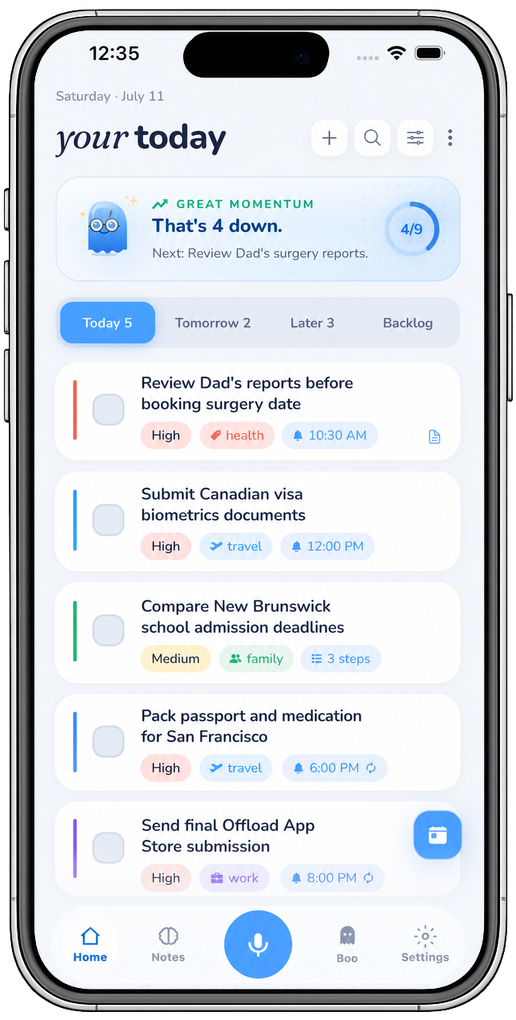
Send Priya the revised flowReview July usageLaunch hook ideaA real MyOffload Today screen inside an iPhoneBoo helping a founder hold the plan

From a busy day to a clear next step

Say what happened. Keep the follow-ups. Decide what to do today.

You do not need to stop and organize every thought. Say the rough version first.

01

After a call, meeting, or sudden idea

Say it while you still remember the context.

Tap the mic and say the customer follow-up, product decision, useful quote, and reminder in one natural offload.

You can speak for up to three minutes. MyOffload keeps the useful parts for you to review.

See how voice becomes a task
Send revised flowPricing concernFollow up ThursdayBoo listening to a founder debrief

02

When the voice dump contains everything

MyOffload separates tasks from notes.

A promise can become a task while the insight behind it stays searchable as a note. Dates and reminders stay with the actions that need them.

Review the result, make any correction, and move on without rebuilding the conversation from memory.

Mixed voice offloadA plum thinking Boo sorting the offload
Send revised flowPricing concernThursday follow-upLaunch hook idea
03

When a task feels too big to start

Break it into smaller steps.

“Prepare the beta launch” is not one action. Tap Break Down to get starting steps such as confirm the release scope, draft the tester email, and check onboarding.

Use the result as a starting point. You stay in charge of what is correct and important.

Prepare the beta launch
Boo beside the smaller launch steps
1Confirm release scope2Draft tester email3Check onboarding flow4Choose feedback questions
04

When everything feels urgent

Plan a realistic day.

Tap Plan My Day to put selected work into a useful order. Start with a quick win, protect focused work, and stop treating every open loop as today’s job.

The plan is a suggestion you can edit, not a command.

Today’s plan
Reply to testerReview onboardingDraft release noteSchedule metrics check
A mint happy Boo beside the daily plan
30%of the 242 entrepreneurs in one peer-reviewed survey reported depression.

What the research actually found

Building a company can come with real mental-health pressure.

In a self-report study of 242 entrepreneurs, 30% reported depression and 49% reported at least one lifetime mental-health condition. The result does not mean entrepreneurship caused those conditions, but it shows that founder strain is not a fringe experience.

This was a cross-sectional, self-report sample and is not a universal founder prevalence rate. It did not test MyOffload or any productivity tool. Read the peer-reviewed study.

A useful boundary

A second brain is not your company system of record.

Where MyOffload helps

Capture rough follow-ups, everyday ideas, personal tasks, reminders, starting steps, and a workable daily sequence while context is fresh.

What should stay elsewhere

Do not record passwords, payment details, regulated customer data, or confidential company secrets. Use the right secure system for sensitive business information.

Simple answers

Frequently asked questions about MyOffload for founders

How can founders use MyOffload?

Speak a rough debrief after a meeting, capture follow-ups and ideas, break down large tasks, and create a realistic plan for the day.

Can MyOffload separate tasks from notes?

Yes. It finds useful tasks and notes inside a mixed voice offload for you to review.

Can it break down a large project?

Yes. Tap Break Down on a task to turn a broad piece of work into smaller starting steps.

What does Plan My Day do?

It helps order selected work into a more realistic sequence so the next useful action is clearer.

Should I store confidential company information here?

No. Avoid passwords, payment details, sensitive customer data, and confidential company secrets.

Your head is not the company backlog.

Capture the rough version, keep the context, and return to a clear next move.

Download iOS app